

The 7 Moves Every Pro Makes Before They Touch an EQ
Quick answer: Professional mixes sound good before a single EQ or compressor is inserted. That's not talent. It's preparation. Gain staging, phase correction, sample alignment, bass mono, high-passing, pan law, stereo width. Seven moves, ninety seconds a track. Skip them and you'll spend the next six hours using EQ to solve problems that were never EQ problems in the first place.
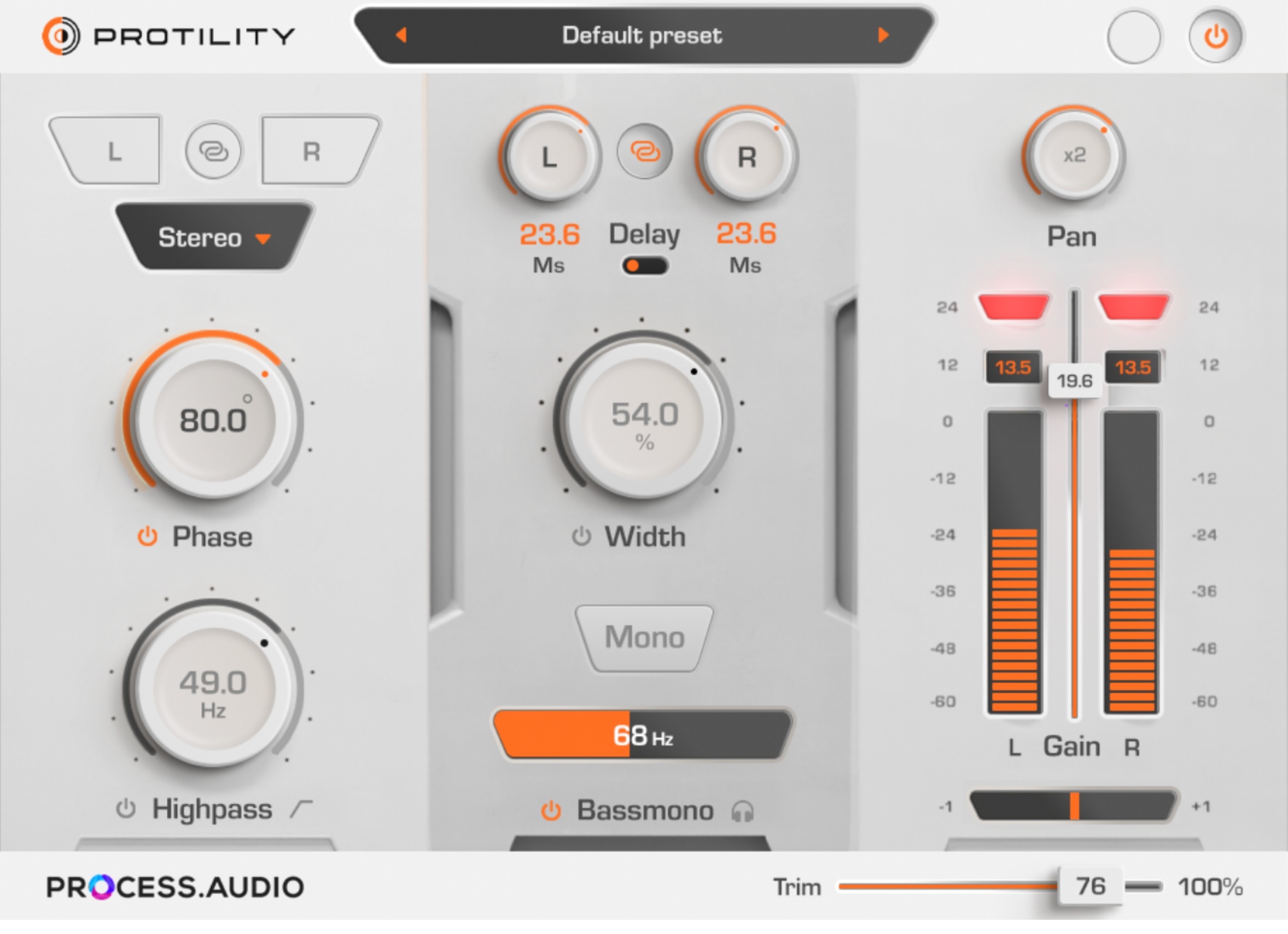
Here's the checklist, and a free plugin that does all seven in one window.
1. Gain staging: the one everybody thinks they understand
Every plugin you own was modelled at a specific input level. Analog emulations in particular have a sweet spot, a level where the saturation, the compression knee and the harmonic content behave the way the designer intended. Feed one a signal at -6 dBFS and you're driving it far harder than the hardware ever saw.
The rule is boring and it is correct: land your tracks around -18 dBFS RMS before any processing. That's roughly 0 VU on an analog meter, and it's where the entire ecosystem was calibrated.
Protility gives you a gain control from -60 dB to +24 dB with peak metering and clipping LEDs. Set it once, at the top of every channel, before anything else.
2. Trim: the control nobody has, and everybody needs
Here's a problem you've had and never named.
You gain-staged your vocal perfectly. Then you rode the fader for four hours. Then you realised the whole thing needs to come down 2 dB, and you can't touch the fader without destroying every automation move you made, or the gain without changing how hard you're hitting your compressor.
Protility's Trim sits at the very end of the chain, after everything. Adjust overall volume without disturbing your gain staging or your mixdown fader. It's the correct answer to a question most people solve badly.
3. Phase invert: check it, always, on everything multi-miked
Snare top and snare bottom. Kick in and kick out. DI and amp. Two overheads. Guitar with two mics.
If any pair is out of polarity, the low end cancels. You will hear a thin, hollow sound and you will try to fix it with an EQ boost. It will not work, because the energy isn't attenuated. It's gone.
Protility lets you invert phase per channel (left, right, or linked) and offers A/B comparison so you can hear the difference immediately rather than reasoning about it.
4. Phase rotation: for the 90% of problems that aren't 180°
Polarity flip is binary: 0° or 180°. Real-world phase relationships almost never sit at either extreme.
Two mics at different distances from a snare produce a frequency-dependent phase offset. Flipping polarity might improve it. It rarely fixes it.
Protility's Phase Control applies a first-order all-pass filter with adjustable cutoff frequency, rotating low-frequency phase continuously. Sweep it while listening to the kick and the bass together. When the low end suddenly appears, stop.
This is a mastering-grade technique, hiding in a free plugin.
5. Sample delay: alignment, and the Haas effect
For alignment: a mic 30 cm from a source is roughly 40 samples late at 48 kHz. Nudge it back and the transient sharpens.
For width: delay one channel by 5–30 ms and the human brain localizes the sound toward the earlier channel while perceiving greater width. This is the Haas effect, and it's the fastest way to widen a mono source that exists.
Protility delays left and right independently, in samples or milliseconds, linked or free.
(A warning, because nobody gives it: Haas widening collapses in mono. Always check.)
6. Bass mono and stereo width: the two ends of one control
Low frequencies carry the most energy and the least directional information. Stereo bass eats headroom, causes phase cancellation on club systems, and can literally make a vinyl cutting head jump out of the groove.
Mono your bass. Widen everything above it.
Protility's Width Control modifies the side component from 0% (full mono) to 400% (ultra-wide). The 1.1 update added M/S encode/decode and lets you split the width slider into independent Mid and Side controls.
Tighten the low end. Open the top. Depth and impact, without a single EQ move.
7. High-pass, but with the right slope
Everything that isn't a kick or a bass has energy below 80 Hz that contributes nothing but headroom consumption and mud.
The subtlety is the slope. A gentle 12 dB/octave preserves warmth just above the cutoff. A steeper 18 dB/octave removes rumble decisively when you need the space.
Protility offers both, sweepable across the full range.
Bonus: the correlation meter you're not looking at
Protility includes phase correlation metering. The number tells you whether your stereo signal will survive being summed to mono: on a phone speaker, a club PA, a laptop, a TV.
- +1: fully correlated (mono-compatible)
- 0: uncorrelated (wide, but check it)
- -1: anti-correlated (your signal will disappear in mono)
Watch it while you use the Width control. It will teach you where the limits are.
Protility also includes a proper Mid/Side encoder. It separates mid and side, placing mid on the left channel and side on the right, so you can process them independently with any plugin in the chain, then decode back to stereo.
And it has a light mode and a dark mode, because you shouldn't have to burn your retinas at 3 a.m.
Why is it free?
Because PROCESS.AUDIO was founded by working engineers, led by Fab Dupont, who believe the tools that go on every single track shouldn't cost anything.
Protility is the plugin that lands first. It costs nothing, requires no iLok, and runs everywhere: Pro Tools, Cubase, Logic Pro X, Ableton, Studio One and Luna, in AAX, AU and VST3, on macOS 10.13+ (Apple Silicon native) and Windows 8.1/10/11.
The rest of what we build (a metering system that streams to your phone, a full-spectrum enhancer four award-winning engineers helped design, an all-tube vari-mu compressor, a visual delay) is what you reach for after the preparation is done.
FAQ
What is gain staging and why does it matter? Setting the level of a signal so it enters each processing stage at the level that stage was designed for. Analog emulations behave differently at different input levels; targeting roughly -18 dBFS RMS puts them in their intended operating range and leaves ample headroom on the bus.
Should I mono my bass? Below roughly 100–120 Hz, yes, in almost every case. Low frequencies carry little directional information, and stereo content down there causes phase cancellation on mono playback systems, wastes headroom, and creates problems for vinyl cutting.
What's the difference between polarity inversion and phase rotation? Polarity inversion flips the entire waveform by 180° at all frequencies. It's binary. Phase rotation uses an all-pass filter to shift phase continuously and frequency-dependently, which is what real-world microphone-distance problems actually require.
What is the Haas effect? Delaying one channel by roughly 5–30 ms causes the brain to localize the source toward the earlier channel while perceiving increased width. Effective for widening mono sources, but it collapses when summed to mono, so verify with a correlation meter.
Is Protility really free? Yes. No iLok. No trial period. Full functionality.
Prep your tracks. Then mix.
Gain. Trim. Phase. Delay. Width. Pan. High-pass. Correlation. Mid/Side.
One plugin. Every channel. Zero dollars.
Once your tracks are prepped
Preparation gets you to zero. These get you to a record:
- Sugar: full-spectrum harmonic enhancement. Four faders, eight colors.
- Decibel: loudness, dynamics and phase metering, streamed to unlimited phones and tablets.
- Rockruepel COMP.TWO: all-tube vari-mu glue.
- Spicerack: creative distortion with a console remote.
- Ripple: visual delay with send-and-return ducking.
- Filter Factory: motion, texture and eight filter voicings.
Start a 30-day free trial of any of them →